Review your setup before the draft.
PUBLISHER FACTORY / YOUR IDEA, BUILT IN STAGES
Create educational books
and workbooks.
Turn a curious question into a book to read, or an activity into a workbook to work through. Start with editable presets, use your chosen AI, then review the content and matching interior, cover and listing in one guided workspace.
PLANNED CORE OFFER$27ONE-TIME1 brand/pen name
Individual Book & Workbook projects
Checkout inactive
Individual Book & Workbook projects
Checkout inactive
Automatic setup with editable presets.
Or take control, Step by step.
YOUR CHOSEN AI / THREE CLEAR ACTIONS
Your direction.
Your AI. Your review.
Set the brief and editable settings, then use the prepared prompt to carry that direction into the AI tool you prefer. Bring its response back to the same project.
For longer content, continue with the next prepared part and import each response in sequence. Review and correct what you save before creating files. An API connection is optional; provider subscriptions and charges are separate.
PROMPT → CHOSEN AI → IMPORT & REVIEW
- 01Copy the prompt
Prepare it from your editable brief.
- 02Use your chosen AI
Paste it into your preferred tool.
- 03Import and review
Save the response, check it and revise.
Recording pending. A recorded product demonstration is pending. This summary explains the intended process and is not a recorded demonstration.
THE PLANNED CORE OFFEROne guided workflow. $27 one-time.Offer in preparation · checkout disabled · no purchase action
Review Publisher Factory CoreA process you can look inside.
Distinguish content from inspected files.
Check the source and PDF pair together.
THE SPACE BETWEEN TOOLS
A promising idea.
Seven disconnected tasks.
The idea is in your notes. The draft is in an AI conversation. The layout, cover and listing each live somewhere else. By the time you are ready to export, it can be difficult to tell which version each piece describes.
Did the listing change after you corrected the manuscript? Does the cover match the interior you inspected? Did the package include that last revision? These are ordinary production questions, and they deserve a visible place in your workflow.
Publisher Factory brings the stages into one guided project, with saved-progress labels and review checkpoints that help you see what to work on next.
BriefDraftReviewInteriorCoverListingExport
A PRACTICAL WAY TO MAKE PROGRESS
Let AI help with the draft.
Keep the editor’s chair.
A prepared prompt gives the AI direction. Import brings its response into the project. Review lets you decide what stays, what changes and what needs checking. You have a process to follow without handing over the judgment that makes the book yours.
THE FACTORY PATH
Discover. Build. Verify. Package.
Four connected phases, with the work visible between them.
Give your idea a direction.
Choose a starting idea or bring your own. Shape the audience, purpose and brief before asking AI to write.
Make the draft your own.
Use editable settings, prepared prompts and your chosen AI. Bring the response back into a project you can review.
See what needs attention.
Read the source, check the listing, inspect the interior and cover, and return to the stage that needs correction.
Know what you are exporting.
Bring the matching files and review records together. Inspect the package before your own publishing decision.
SET UP. MAKE & REVISE. INSPECT & EXPORT.
Six steps.
One project to keep moving.
The Book and Workbook wizard gives each stage its own purpose. Follow the next action, save your edits and return to earlier work when a later check calls for a change.
- 01
Set up your book
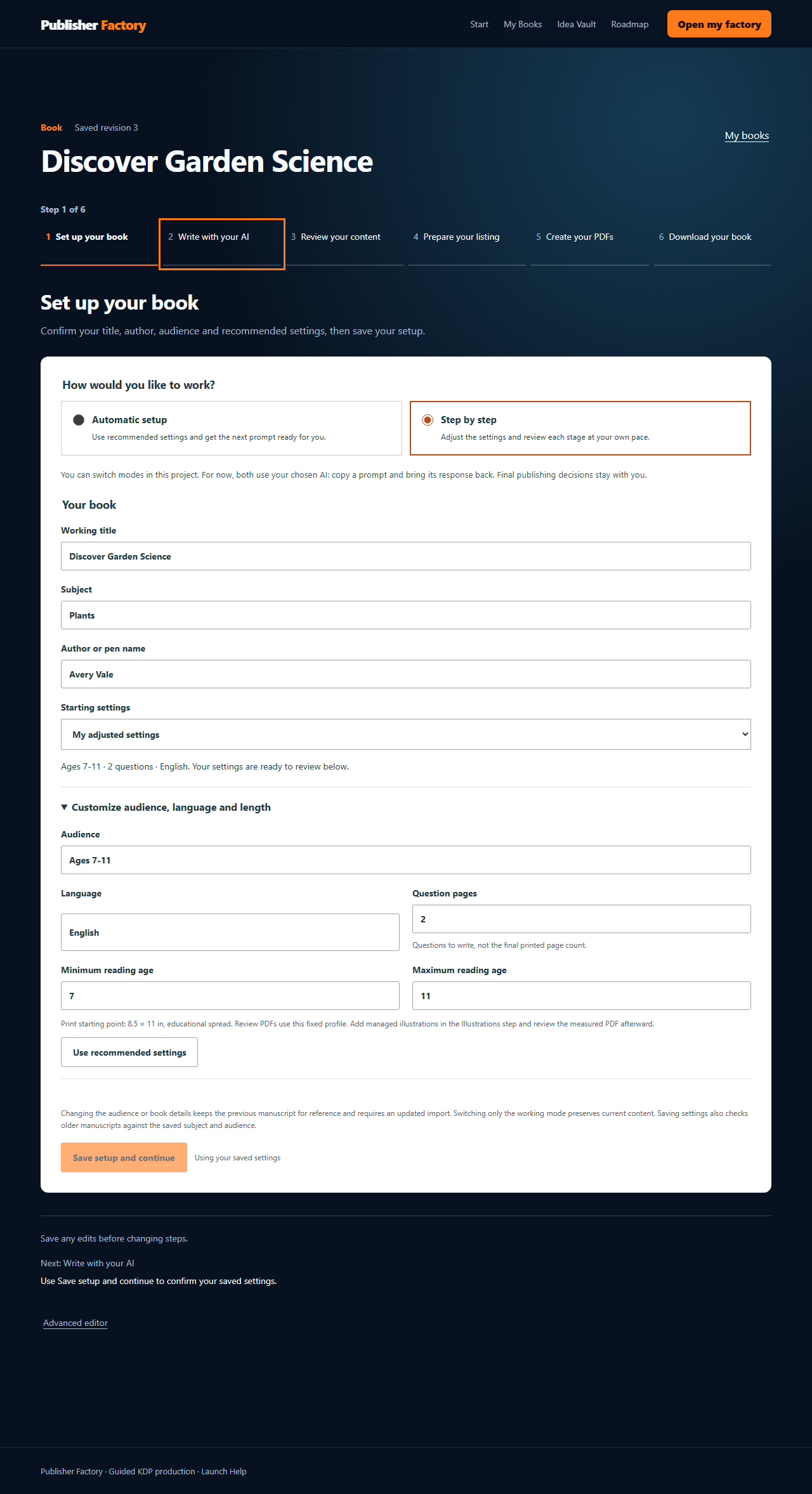
Turn an idea into a usable brief. Confirm the title, author or pen name, subject, audience and starting settings. Automatic setup supplies recommended settings; Step by step lets you adjust the choices at your own pace. Both keep the settings editable.
- 02
Write with your AI
Copy the prepared prompt to the AI tool you choose. Bring its response back, import it and check the result. The prompt carries your project direction, so you have a starting structure to work with instead of a blank chat. A connected API is optional.
- 03
Review your content
Read the saved pages and make corrections. For a workbook, review activities and answers together. For an educational book, check the questions, explanations and supporting material. Source validation helps surface structural issues; accuracy, suitability and editorial judgment still need your attention.
- 04
Prepare your listing
Work on the title, description and other listing details beside the content they describe. Check the claims against the saved project and choose AI declarations explicitly. A polished description should represent the book you actually made.
- 05
Create your PDFs
Create and inspect the interior first. Then work on a cover for that measured interior and check the required cover-template details. Open the pages, look at typography and fit, and revise when needed. Creating a file is one stage; inspecting it is another.
- 06
Download your book
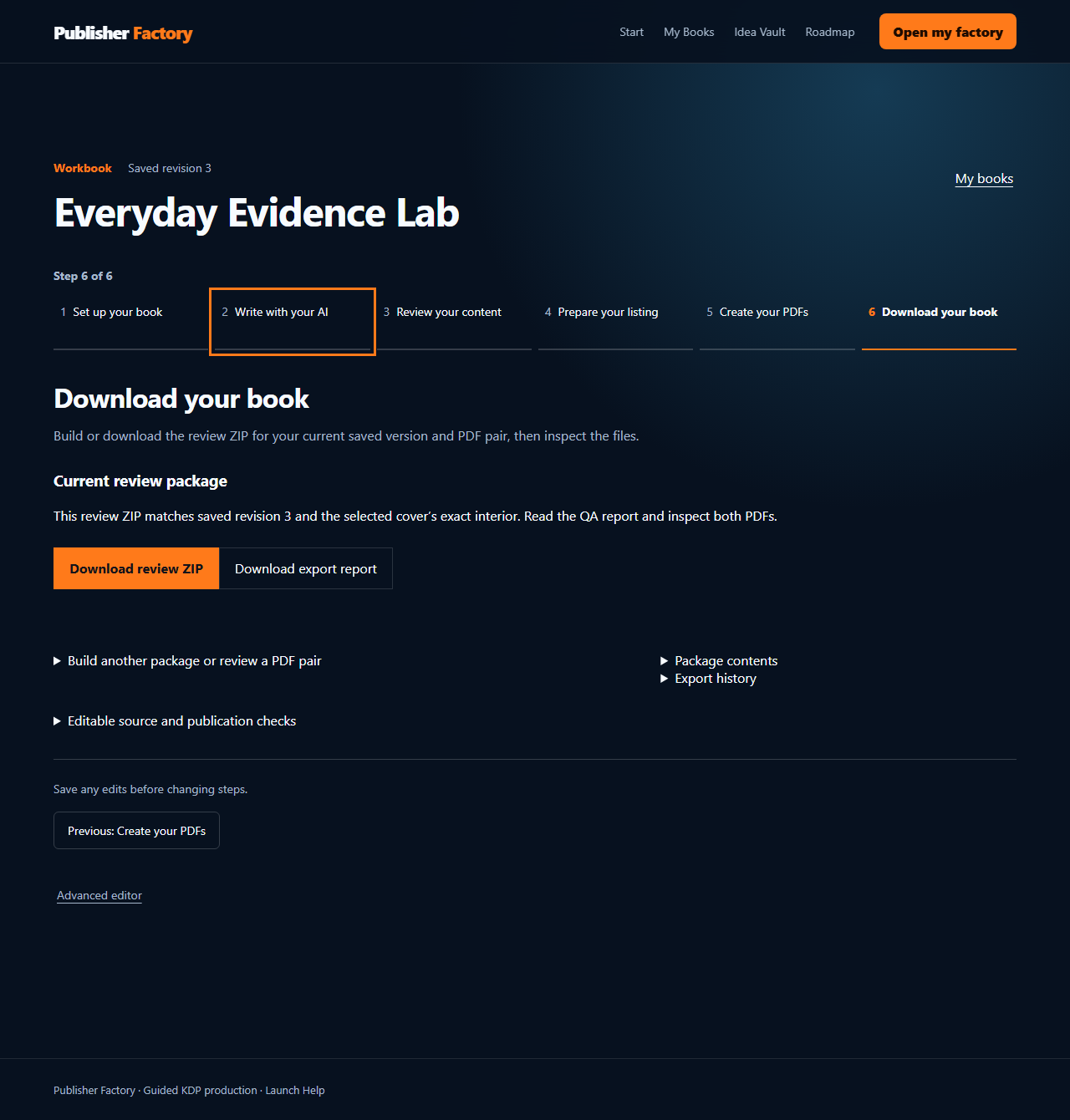
Build a review ZIP for the current saved version and matching PDF pair. Read the QA report, inspect both PDFs and use the checklist. Final export requires the blocking findings and recorded human review to be complete. You upload through your own KDP account.
FROM SAVED WORK TO REVIEW PACKAGE
Know which book
is in the ZIP.
The download stage ties the review package to a saved revision and its selected PDF pair. That connection matters: you want the source, listing and review records to belong to the same work you are inspecting.
The local example shows the Workbook download stage with synthetic demonstration data. Read the report, inspect the PDFs and check the contents before treating a package as final.
A complete public walkthrough still needs a rights-cleared project, matching final files and reviewer notes. The example shown here is not that proof.
TWO CORE WORKSPACES / LOCALLY DEMONSTRABLE
A book to read.
A workbook to work through.
Book Builder
Shape a question-led educational brief and review paired question and explanation pages, then follow listing, cover, preflight and export stages. The current Book format is built around educational questions and supporting material.
Workbook Studio
Use structured setup and imported activity content, then review the activities and answers before production. The checkpoints help keep the learner’s material and the supporting answers in the same project.
This page describes locally demonstrable Book and Workbook workflows. Customer availability needs verification. Additional story, activity and visual modules are roadmap items, not tools included as usable today.
Reviewed public samples are pending. Editorial review, rights checks and a print proof must be complete before final sample publication.
DIFFERENT STARTING POINTS / A COMMON PATH
Start where you are.
Know what comes next.
If you are new to independent publishing, the wizard gives the production tasks an order. Work through setup, content and files with a visible reminder of which stage you are in and what you still need to review.
Keep the pieces connected.
If you already have a concept and a preferred AI tool, bring them into the process. Use the project to keep the draft, production decisions and listing aligned as the work changes.
Understand the separate rights.
For paid work on behalf of others, review the separate Client Services License. Core is planned for your own books; a client workflow needs the additional license and its workspace limits.
WHAT YOU GET WITH THE PLANNED CORE OFFER
The full Core path.
No required upgrade to finish it.
Research and Idea Vault → Book or Workbook → Cover → Listing → Preflight → Export. Planned for 1 brand/pen name and individual projects.
Find a starting direction
Bring an existing concept or examine a curated idea, then adapt its audience, angle and structure. The brief gives the later stages a common reference; it does not decide market demand for you.
Start with guidance. Keep your choices.
Use recommended settings to establish the project, then edit them. Prefer to make each decision yourself? Use the Step by step path. The modes support the same human-controlled workflow.
Keep the AI tool you prefer
Take a prepared prompt to your chosen AI and bring the response back for validation and editing. Core supports this route without requiring an API key or making you buy a particular AI subscription.
Build around the kind of content you make
Use Book for question-led educational content or Workbook for structured activities and answers. Keep source, review and production checkpoints attached to the individual project.
Connect the presentation to the pages
Review the cover against the actual interior, and edit listing information against the content. You can address the book and its presentation within the guided production sequence.
Inspect the work before it leaves
Use findings, review records and saved-progress labels to distinguish source, PDF inspection and package status. Export brings the files together; your final quality and publishing decisions stay yours.
QuickStart assets, All Access catalog subscriptions, Pro workflow and Client Services rights are separate options. They have their own prices and scope; none is required to finish a Core project.
IDEA VAULT / SIX EDITABLE STARTING POINTS
A starting point
you can reshape.
Choose a question-led educational Book or an activity-based Workbook concept. Open the existing brief, adapt the audience and direction, and keep its settings editable.
Existing authentication and module access apply. Following a link does not create a project. A starting brief still needs topic research, safety review and originality checks. Hosted availability remains unverified.
Volcanoes: A Curious Reader's Guide
Explore moving rock, eruptions and changing landscapes.
Explore this editable briefFossils: A Curious Reader's Guide
Use traces to ask careful questions about an ancient habitat.
Explore this editable briefRivers: A Curious Reader's Guide
Follow water from its source to the delta.
Explore this editable briefFarmers' Market Math
Practice money, measurement and everyday data in fictional scenarios.
Explore this editable briefBackyard Science Lab
Build observation skills with safe investigations and reflection.
Explore this editable briefEveryday Data Detective
Read tables, compare claims and reason from evidence.
Explore this editable briefPREFLIGHT / HUMAN REVIEW
Catch a finding.
Return to the work.
Make the correction.
Preflight can flag missing or inconsistent source, listing and production details and direct you back to the relevant stage. That makes the check useful within the workflow: a finding points to work you can address.
You still read the pages. Check facts, activity answers, image rights, typography, cover fit and KDP disclosure. Automated validation can support that review; it cannot certify the book’s quality or decide whether you should publish it.
Flags & checkpoints
Surface supported structural and production issues.
Read & inspect
Correct content, check rights and open the actual files.
Revise or upload
Make the final decision through your own KDP account.
YOUR COMPLETE PROJECT PACKAGE
More than two PDFs.
The context to review them.
The local Book and Workbook builders bring production files and review material into a ZIP. Open the pages, read the findings and check the contents together, with the source and checklist there to support your final review.
- 01Interior and cover PDFs
- The matching page and cover files to open and inspect.
- 02Listing text and JSON
- Readable listing information plus its structured version.
- 03QA reports in JSON and HTML
- The findings in both a structured and readable format.
- 04Upload checklist
- A practical reference for your own final publishing checks.
- 05Project-source JSON
- The saved source represented in the export package.
- 06File manifest
- A record of the files included in that package.
An export requires a matching completed interior and cover. Final export requires blocking QA findings to be resolved and human review to be recorded, including required cover-template checks. A review ZIP is not ready for upload. The package does not certify KDP acceptance or physical print proof. Hosted delivery remains unverified.
THE PLANNED CORE OFFEROne guided workflow. $27 one-time.Offer in preparation · checkout disabled · no purchase action
See the Core scope & priceTHE PLANNED FRONT-END OFFER
Publisher Factory Core.
Your next project,
with a clearer path.
One brand/pen name. Individual Book and Workbook projects. Editable setup, prepared prompts for your chosen AI, manual import, review, cover, listing, preflight and export.
The planned standard license covers your own books. You retain responsibility for the material, its rights and the final files. Third-party AI charges are separate; a Core purchase does not supply AI credits or a provider subscription.
After a verified purchase, access and receipts must follow the actual WarriorPlus transaction. This preparation page does not initiate a payment or grant customer access.
PLANNED REFUND TERMS / LEGAL REVIEW
14 days for the initial purchase.
The plan sets 14 days for an initial purchase and 7 days for an annual renewal. Monthly renewal exceptions are narrower. Before the offer opens, the published Refund Policy and WarriorPlus product settings must use the same final wording. Support contact: info@publisherfactory.com.
THE PLANNED CORE OFFEROne guided workflow. $27 one-time.Offer in preparation · checkout disabled · no purchase action
Review Publisher Factory CoreIS THIS YOUR WAY OF WORKING?
For the publisher
who wants to stay involved.
You want a structured route from concept to production, with room to change the settings and correct the draft. You are willing to read what the AI returns, inspect files and make the publishing decision yourself.
You will need an AI tool for the default external-prompt route and your own KDP account to publish. Bring a willingness to check the content, understand the rights and revise the work.
Publisher Factory does not promise a profitable niche, sales, factual perfection, platform endorsement or KDP acceptance. Its role is to organize and support the production process you control.
BUYER QUESTIONS
A few things to know
before you choose.
Do I need an AI API key?
No API key is required for the prompt-and-import route. A connected API is optional. Core does not include a third-party AI subscription or AI credits. Any charges from your chosen AI provider are separate. You choose the AI tool, edit its response and review the result.
What does Automatic setup actually do?
It supplies recommended settings and prepares the next prompt. It does not remove review or publish a book on your behalf. You can edit the settings or use Step by step, and both modes use your chosen AI with the prompt-and-import route.
Can I edit what AI gives me?
Yes. Import the response, read the saved content and make corrections before production. Check facts, activity answers, audience suitability and rights. A generated draft is material to review, rather than a final editorial decision.
Does Publisher Factory upload to KDP?
No. You inspect and export the project, then use your own KDP account. You remain responsible for the upload, rights, AI disclosure and the current requirements of the publishing platform. No KDP approval or book sales are guaranteed.
What files does the workflow produce?
The local Book and Workbook workflow packages interior and cover PDFs, listing files, QA reports, an upload checklist, project-source JSON and a manifest. This draft describes print-oriented PDF review; it does not promise an ebook format or a physical print proof.
Do I have to buy an upgrade to finish a Core project?
No. Core is planned to stand on its own for individual Book and Workbook projects and 1 brand/pen name. QuickStart assets, All Access, Pro workflow and Client Services License are separate options with their own scope and terms.
Can I sell my books or create books for clients?
The planned standard license covers your own books, subject to rights in the material and final review. Paid work for third parties requires the separate Client Services License. Core does not grant software resale or shared-account rights.
Are all future modules included with Core?
No. Roadmap modules are not usable Core features. All Access is planned to cover future catalog modules when each is actually released during an active subscription. Check the separate offer rather than treating an unreleased tool as available now.
Where do I get support?
The supplied support and affiliate contact is info@publisherfactory.com. Include the project or order reference and describe the issue. Final customer-facing support instructions and the published legal policies must be aligned with the approved offer before it opens.
What are the refund terms?
The commercial plan provides 14 days for the initial purchase and 7 days for an annual renewal; monthly renewal exceptions are narrower. These are planned terms under legal review. The published Refund Policy and WarriorPlus settings must use the final matching wording.
YOUR IDEA DESERVES A PROCESS
Make the book.
See the work.
Keep control.
Give the brief a direction. Work with your chosen AI. Review the content, connect the production files and inspect the package. The planned $27 one-time Core offer brings those stages into one guided path.
THE PLANNED CORE OFFEROne guided workflow. $27 one-time.Offer in preparation · checkout disabled · no purchase action
Review Publisher Factory CoreOFFER IN PREPARATION / RELEASE STATUS
The workflow is taking shape.
The release still needs evidence.
Business identity
Amortoae Petru PFA · CUI 52361814
Support contact
info@publisherfactory.com
Offer status
In preparation · checkout disabled
- A complete recorded walkthrough, reviewed product screenshots and a rights-cleared sample package are still being prepared.
- Final Terms, Privacy Policy, Refund Policy, Earnings Disclaimer and applicable licenses must be published before checkout opens.
- Official checkout, receipts and customer delivery must be verified before accepting purchases.
The local screenshots use demonstration data. Reviewed public Book and Workbook samples remain pending. No customer results, income claim, scarcity or platform endorsement is presented. This page does not establish offer approval or readiness to open checkout.